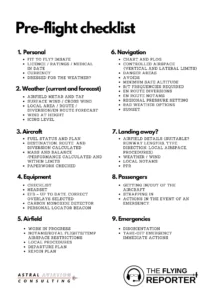
Moving an entire data center feels like trying to rebuild an airplane while it is still flying at thirty thousand feet. It is a massive undertaking that requires every piece of equipment, every bit of data, and every operational workflow to align perfectly during the transition. To make sense of this chaos, most IT managers and infrastructure leads look for a reliable data center migration checklist template to guide them through the labyrinth of tasks. Having a roadmap ensures that nothing gets left behind and that the business continues to function even as the physical or virtual hardware moves from one location to another.
The complexity of a migration project usually stems from the sheer number of dependencies involved. You are not just moving servers; you are moving the lifeblood of your organization. Every database, application, and security protocol must find its new home without causing a significant disruption to the end users. This process requires a blend of technical expertise, project management skills, and a healthy dose of patience. Without a structured approach, it is incredibly easy for small details to fall through the cracks, leading to unexpected downtime or even data loss.
When you sit down to start planning, the first thing you realize is that no two migrations are identical. Some companies are moving from an on-premise facility to a colocation provider, while others are shifting everything to a private or public cloud. Regardless of the destination, the core principles of preparation remain the same. You need a way to track your progress from the initial discovery phase all the day to the final post-migration audit. By organizing your efforts into manageable steps, you can turn an overwhelming project into a series of successful milestones.
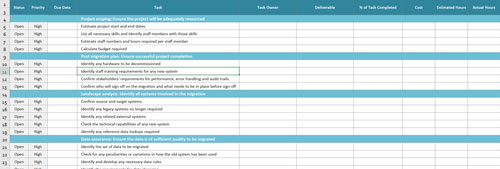
Building a Comprehensive Strategy for Your Move
The discovery phase is perhaps the most critical part of any migration effort. This is where you dig deep into your current environment to understand exactly what you have. You cannot move what you do not know exists, and many IT departments are surprised by the number of legacy systems or forgotten virtual machines humming away in a corner of the server room. During this stage, you should document every piece of hardware, its physical location, and its specific role within the network. This inventory acts as the baseline for everything that follows.
Once you have a clear picture of your physical assets, you need to turn your attention to the logical side of things. This means mapping out the relationships between different applications and services. If you move a database server but leave the web server that relies on it in the old location, you are going to run into latency issues or total service failure. Understanding these dependencies allows you to group systems together so they can be migrated in logical waves rather than all at once, which significantly reduces the risk of a catastrophic failure.
Assessing Risks and Technical Requirements
Every migration carries inherent risks, and identifying them early is the best way to mitigate their impact. You need to consider what happens if a piece of hardware fails during transport or if a data synchronization task takes longer than expected. Part of your planning should involve creating a detailed risk assessment that outlines potential problems and provides a clear plan for how to handle them. This might include having spare hardware on standby or ensuring that you have multiple verified backups stored in a completely separate location before the move begins.
Technical requirements also extend to the new site where your data will live. You need to verify that the power, cooling, and connectivity at the destination are sufficient for your needs. It is not uncommon for teams to arrive at a new facility only to find that the rack configurations are different or that the network cabling does not match their existing hardware. Checking these specifications well in advance saves a tremendous amount of time and frustration on the actual day of the move.
Managing the Human Element and Timelines
While the technical aspects are demanding, the human element of a migration is just as important. You need a dedicated team with clear roles and responsibilities. This includes everyone from the network engineers and system administrators to the stakeholders who need to be kept in the loop about potential outages. Effective communication ensures that everyone knows what is expected of them and that there are no surprises when the maintenance window begins. Regular meetings and status updates are essential for keeping the project on track and keeping stress levels manageable.
Finally, you must establish a realistic timeline that accounts for every phase of the project. A migration is rarely a weekend job; it often spans several months of preparation and weeks of execution. Your timeline should include buffer periods for testing and troubleshooting. If you try to rush the process, you are much more likely to make mistakes that could have been avoided with a more methodical approach. Setting clear deadlines for each stage of the data center migration checklist template helps maintain momentum and ensures that the project does not stall indefinitely.
Executing the Transition and Ensuring Success
As you move into the execution phase, the focus shifts from planning to precision. This is where the physical and digital heavy lifting happens. Whether you are physically unstacking servers or initiating a massive data transfer over the wire, the key is to follow your predetermined plan to the letter. This stage often happens during off-peak hours to minimize the impact on the business, which means your team needs to be prepared for some long nights. Having a minute-by-minute schedule for the migration window helps keep everyone synchronized and focused on the task at hand.
Once the migration is underway, constant monitoring is required to ensure that everything is proceeding as planned. If you are moving data, you need to verify that the integrity of the files is maintained and that no corruption has occurred. If you are moving hardware, you need to ensure that everything is racked, cabled, and powered up correctly at the new site. The list below highlights some of the most critical elements to keep an eye on during this intense period of the project.
After the systems are back up and running, the work is still not quite finished. You enter the post-migration phase, where you perform extensive testing to ensure that every application is performing as expected in its new environment. This is the time to check for any performance bottlenecks or connectivity issues that might not have been apparent during the initial move. It is also important to keep your support team on high alert for the first few days after the migration, as users may encounter minor issues as they begin to interact with the relocated services.
Reflecting on the entire process allows your organization to learn from the experience and improve future IT initiatives. Every migration offers lessons in coordination, technical strategy, and resource management. By documenting what went well and what could have been handled better, you build a knowledge base that will be invaluable for the next time your infrastructure needs to evolve. A successful move is not just about getting from point A to point B; it is about doing so in a way that strengthens the resilience of your entire IT operation.
Ultimately, the secret to a smooth transition lies in the balance between thorough preparation and the ability to adapt to changing circumstances. While no plan survives contact with reality perfectly, having a solid framework allows you to pivot quickly when challenges arise. The confidence that comes from knowing you have accounted for every server, cable, and application dependency cannot be overstated. It turns a potentially chaotic event into a controlled, professional upgrade that supports the long-term growth of the company.